WordPress 6.9 is right around the corner, all set to be released on December 2, 2025. The buzz? It’s getting louder with each Release Candidate update.
This upcoming version promises smarter design tools, improved performance, and a refined editor experience. Even if you’re a developer, designer, or just a site owner, WordPress 6.9 makes website-building faster, easier, and more creative.
You’ll get a block-level Notes feature for feedback. It offers the option to hide blocks without deleting them. A universal command palette is present. And more!
In this blog, you’ll know everything about WordPress 6.9. We’ve compiled its highly anticipated features and highlights. So, let’s dive right into what’s coming.
IN THIS GUIDE
hide
What’s Coming in WordPress 6.9? Major Features and Highlights
WordPress 6.9 is coming with fresh upgrades on performance, collaboration, and writing. These features are valuable for developers, bloggers, and site owners alike.
Before examining what’s new, don’t forget to log into your WordPress dashboard and try the Release Candidate version of WordPress 6.9.
We’ll walk through its highlights using the Twenty Twenty-Five theme for demonstrations. Now, it’s time to go straight into the features of WordPress 6.9.
1. Contextual Feedback with the Notes Feature
WordPress 6.9 will introduce the Notes feature, an improved version of Block Comments. It’s a new way to leave feedback directly on individual blocks inside the editor. Just like Google Docs comments, Notes works similarly in WordPress.
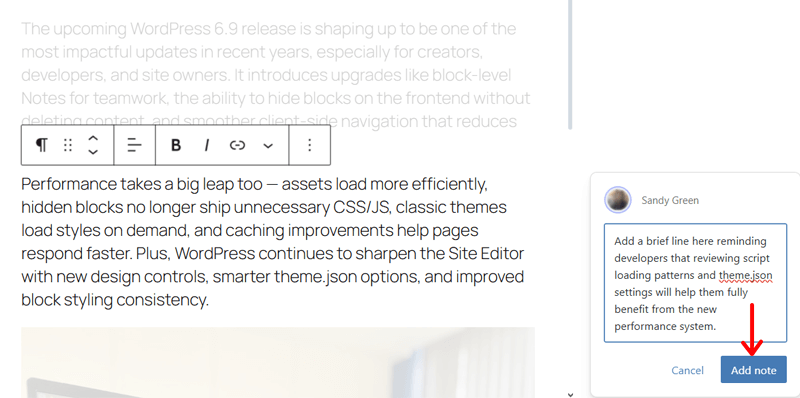
When you open the editor, select a block. On the toolbar, click the three-dot menu at the end. There, you’ll find the new ‘Add note’ option.

Upon clicking on it, you can insert the feedback in the text box. Then, click ‘Add note.’
Now, anyone with access can see, reply to, edit, delete, and mark the note as resolved after the task is done. All of that under the new ‘All notes’ section. When you click on a note, WordPress automatically scrolls to the block with it.
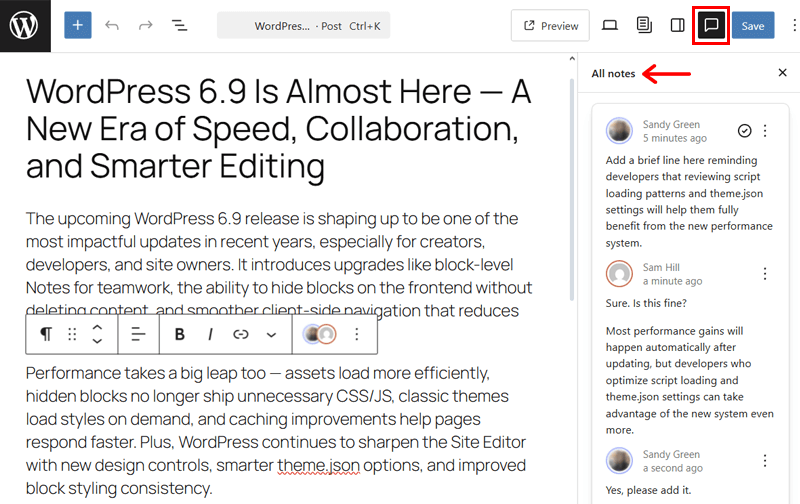
Exactly, Notes work on any WordPress post or page. However, you can turn it on for your custom post types, too.
Understand that notes never show up on your live website. They just exist in the post editor for you and your team to keep feedback organized and private.
In a nutshell, here are some role-based permissions set:
- Administrators and editors can see notes on all posts.
- Authors and contributors can only see notes on the posts that they wrote. Authors are notified if someone leaves a note on their post.
- Subscribers cannot see notes at all.
Therefore, this feature helps your team to stay aligned, share ideas, review content, and get actionable feedback right inside WordPress. So, it makes collaboration faster and editing workflow more efficient.
2. Easily Hide Block in the Frontend
Moving forward, WordPress 6.9 is also introducing the ability to easily hide blocks on the frontend before deciding to delete them. Yes, you heard it right!
This feature lets you keep a block inside the editor while making it invisible to your visitors on the live website. In fact, you can take advantage of this feature in several practical ways:
- Stage new content without deleting anything.
- Experiment with alternate designs safely.
- Preserve drafts or keep placeholder content inside the editor. And more!
If you want to hide a block, then just select that block. Then, click on the three-dot menu present in the block toolbar. There, press the ‘Hide’ option.
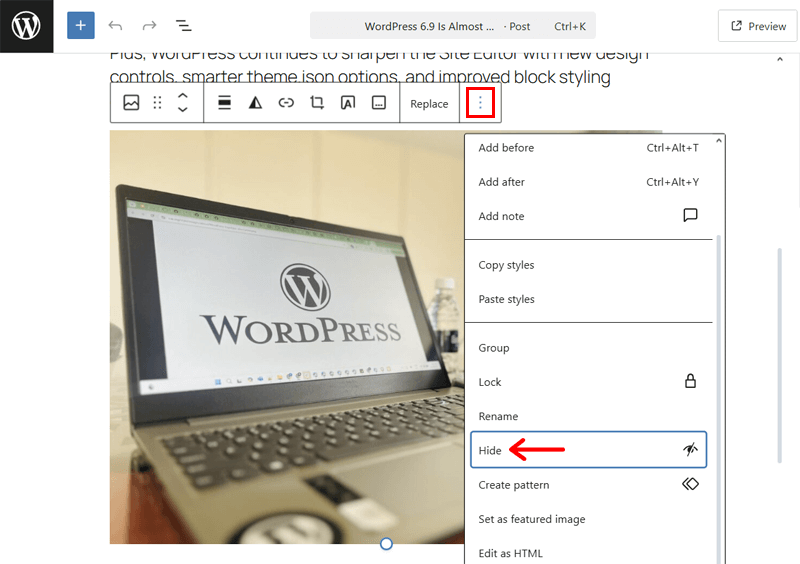
Now, the block instantly disappears from the editor canvas. In addition, it doesn’t show up even on the frontend when you save and preview the page.
So, where has it gone? Note that hidden blocks aren’t deleted. They are just hidden in the List View of your page or post.
To unhide them, you must open the outline panel in the ‘Document Overview’ option at the top. You can spot the hidden block there that you can click.
This opens the toolbar of the hidden block with a visibility icon. If you click the eye icon, then it immediately restores the block to the page or post.

Another way is to open the three-dotted option in the toolbar. It contains a ‘Show’ option with which the hidden block restores back.

Want to know more? When a block stays hidden, WordPress doesn’t load its frontend CSS and JavaScript. This prevents unnecessary bloat, resulting in improved performance despite the number of blocks that your page/post uses.
3. New Blocks Added
WordPress 6.9 also brings new and improved blocks. This expands your design options to showcase your content on your website.
Let’s have a look at some of the new blocks to be added from WordPress 6.9.
i. Accordion Block
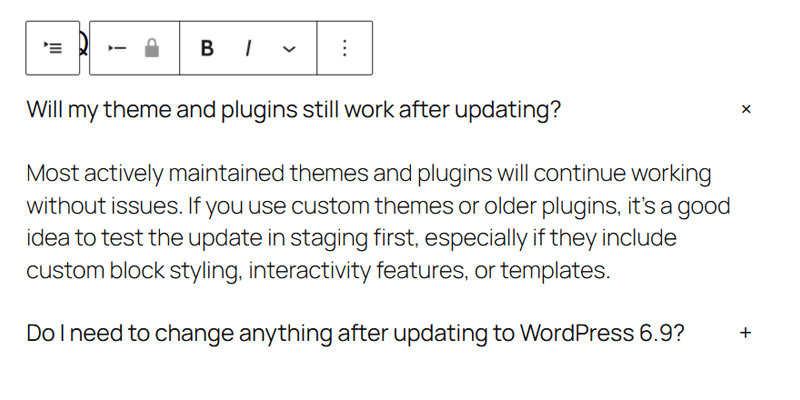
Earlier, site users could use the Details block to display your content in the form of the Accordion component. So, there wasn’t any specific block for an accordion. WordPress 6.9 will offer you an Accordion block that supports nested blocks.
Just insert the accordion block from the block inserter present at the top.
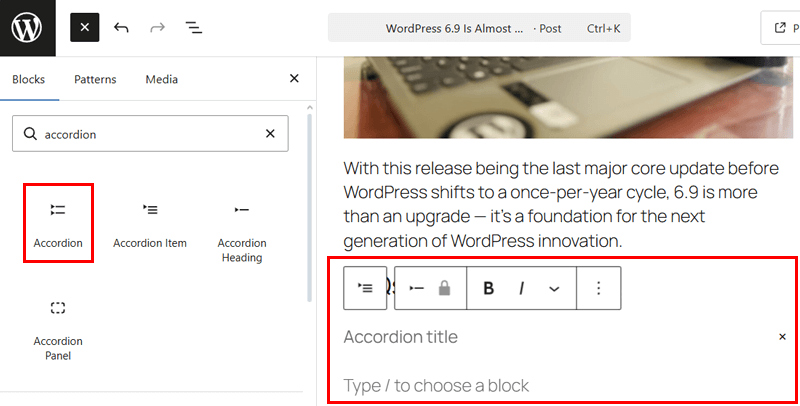
Then, enter the accordion title first. Next, use blocks like paragraphs and images for that title. Similarly, add as many accordions as you want to the post or page with the title and its content.
ii. Math Block
Similarly, the earlier versions needed an external WordPress plugin for you to enter math equations on your site. Keeping that in mind, WordPress 6.9 is set to offer a Math block. It’ll let you quickly write math equations without needing a plugin.
To use this block, insert the Math block.
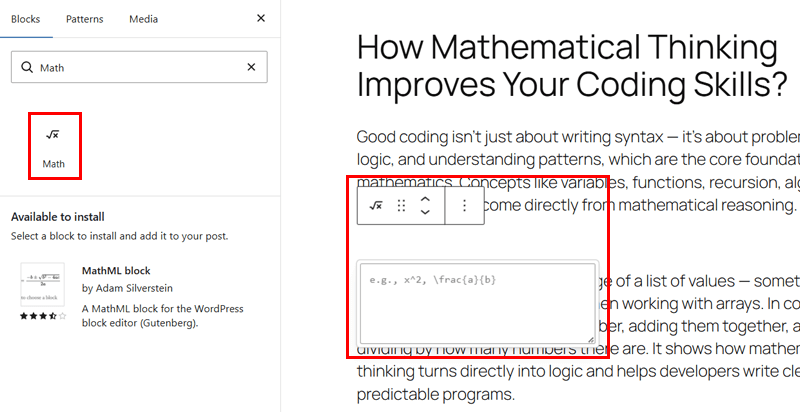
Now, paste your math equation or any sort of content from the mathematical field in the text field that you’ll get below it.
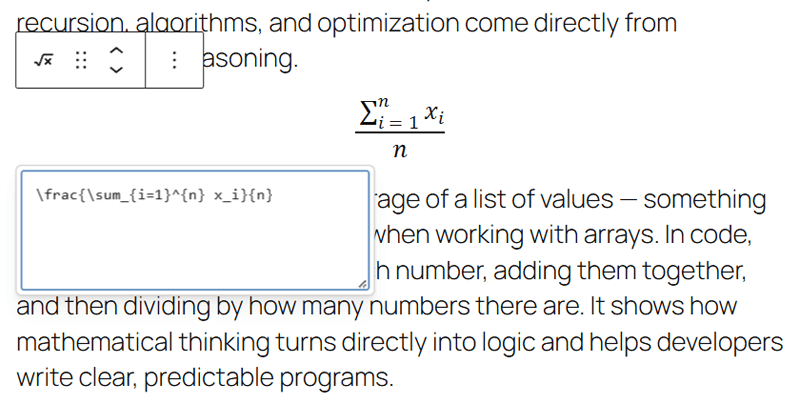
With just that, your web page or post will have complex content, which was not this easily possible before. If you own educational blogs or online course websites, then the Math block is a very handy tool.
iii. Terms Query Block
Another block you’ll find in WordPress 6.9 is Terms Query. This block aims to show terms involved for a taxonomy. For instance, you can display a list of categories and tags with this block.
Once you add the Terms Query block on the editor, you can choose from two layouts, i.e., Name or Name & Count. Suppose we use ‘Name & Count.’
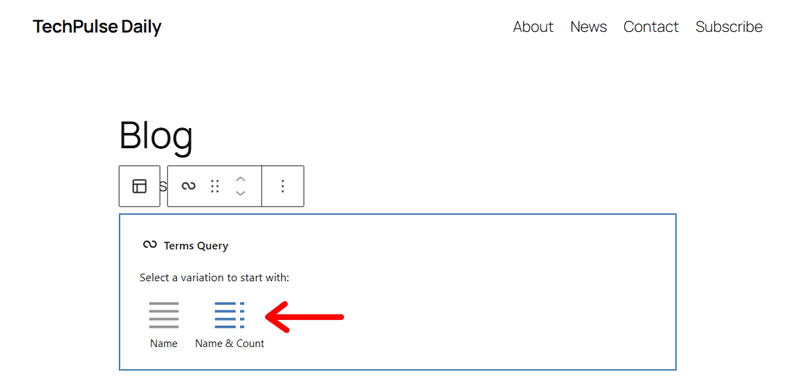
Now, configure the block settings. This involves:
- You can pick the ‘Taxonomy’ between categories or tags.
- You can order the list alphabetically or based on the count value.
- Select which terms to show.
- Specify the maximum number of terms to include.
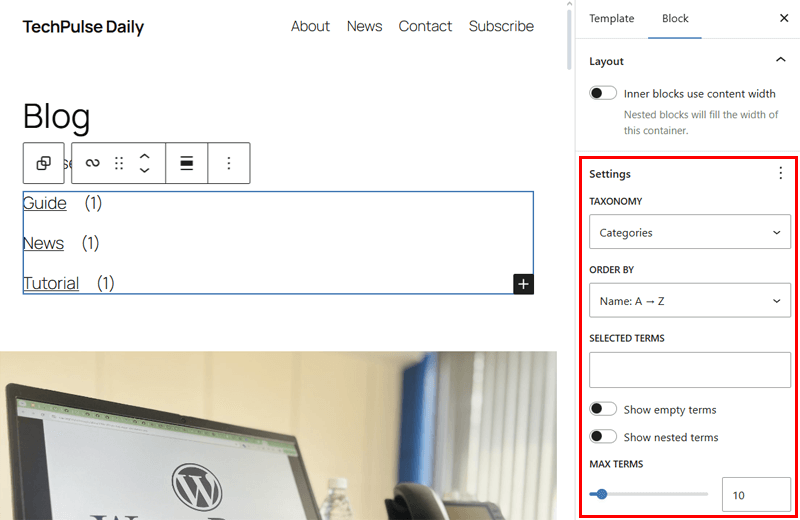
With that, your page or post will have a list of categories or tags with their count values in the order you want.
iv. Time to Read Block
Following that, WordPress 6.9 will also have the Time to Read block. Just as the name says, this block shows the time it will take for a visitor to read the article.
Guess what? You can insert this block in your individual posts or pages in the location you want. In addition, you can also keep it in templates.
Just add the Time to Read block on the post. Now, you’ll get the output in the time range, which can be adjusted to just specify the exact average time that’ll be taken.
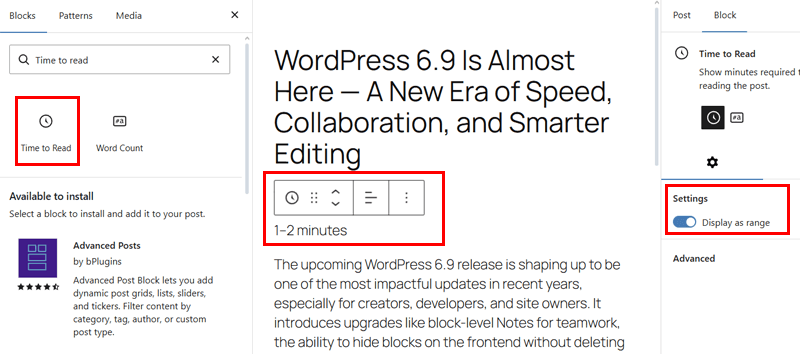
Looks like a small feature? But this block makes a big difference for readers who want to know how long a post will take for them to read. And yeah, the time to read value may make them more likely to click through and complete reading.
v. Word Count
Lastly, there’ll also be a Word Count block in WordPress 6.9. All that this block does is display the number of words, or simply the word count, of the page or post.
Similar to the Time to Read block, you can add this block to individual posts or pages, and even on a template. Once you add the Word Count block, the number of words in that page or post shows up instantly. That’s it!
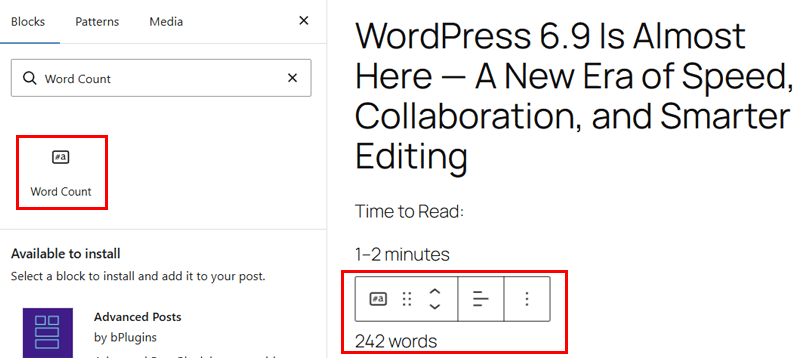
Along with the time to read, word count also helps readers decide about whether to click through or continue reading your content till the end. Pretty helpful, isn’t it?
4. Universal Command Palette
Since a few earlier versions of WordPress, you could find a command palette with quick shortcuts for general website actions. However, this was only available inside the Site Editor, useful when using block themes only.
With WordPress 6.9, this feature becomes universal. Meaning, you’ll get to use the command prompt on every part of your WordPress dashboard, not just the editor.
For example, let’s go to the home dashboard. Now, press ‘Ctrl + K’ on Windows or ‘Command + K’ on a Mac.
With that, you’ll get the improved command palette where you can search for the action you want to perform on your website. This can be from adding a new post to navigating WordPress settings.
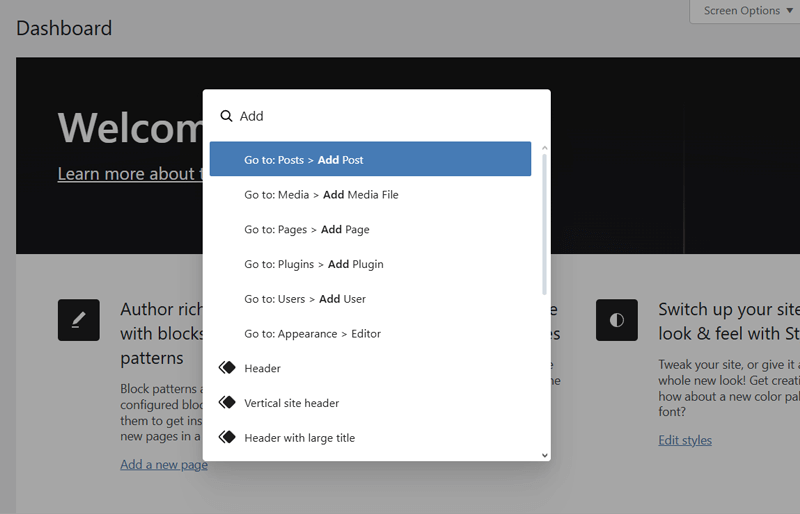
Simply put, you can instantly search, go to certain admin pages, or trigger actions from this command palette. As you can now do this from anywhere, WordPress 6.9 is certain to help you in quick navigation and save a lot of time.
5. Performance Enhancements
On top of that, WordPress 6.9 boosts WordPress performance on both the frontend and backend. That too in many ways. Whether it’s by reducing blocking assets, loading only what’s necessary, or optimizing queries, WordPress 6.9 does it all.
As a result, your WordPress website will have faster load times, smoother editing, and efficient gains across every theme you use. So, let’s check out the performance enhancements that WordPress 6.9 brings one by one.
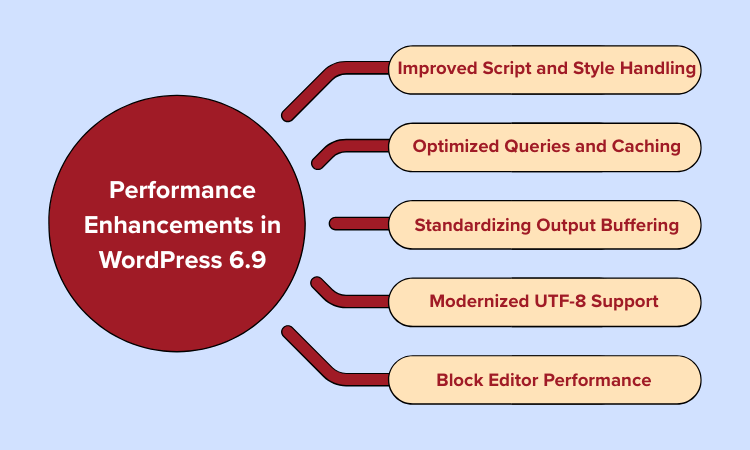
i. Improved Script and Style Handling
First, WordPress 6.9 is set to optimize how scripts and styles load. That’s by prioritizing essential assets, moving render-blocking files to safer locations, and delivering block styles only when needed.
Here are some of the ways it’s doing so. With that, the new version aims to reduce page bloat, speed up rendering, and help browsers to focus on what matters most.
- Scripts now support the ‘fetchpriority’ attribute, which tells the browser which files are most important. The browser now loads those high-priority assets first and improves their loading order.
- Script modules can now be printed in the footer instead of the header, which minimizes render-blocking. This means your pages can start showing content quicker, as the browser isn’t forced to wait for scripts first.
- The emoji detection script is also converted to a module and moved to the footer. It now loads later in the footer for your site to appear faster.
- WordPress minifies block theme stylesheets and allows 40 KB of CSS (previously 20 KB) right in the page. This reduces the number of external CSS files the browser needs to download. This leads to fast page loading.
- Suppose a block is hidden with the new feature of WordPress 6.9. Then, the CSS and JS of such blocks do not load on the live site.
- Classic themes won’t load every block’s CSS from the new version. They load block styles on demand, meaning only those that are used on the page.
ii. Optimized Queries and Caching
In addition, WordPress 6.9 will now refine database and cache behavior, too. This reduces repeated lookups and prevents unwanted cache invalidation. Ultimately, servers handle requests quicker and page responses better.
These are the query and caching optimization techniques in WordPress 6.9:
- WordPress 6.9 now runs scheduled background tasks after the page has loaded and not during the request. This minimizes pressure on the server.
- There are improvements in the caching for RSS feeds and database options. Now, WordPress doesn’t keep fetching the same information repeatedly.
- WordPress will avoid rechecking the same data many times when generating a page template. So, the decreased server load improves site speed.
- The new upgrade will generate the same cache key for similar database queries. Meaning, cached results can be reused to lower database load. This offers efficient backend performance for large‐scale sites to developers.
iii. Standardizing Output Buffering
WordPress 6.9 offers a new template enhancement output buffer to process markup and styles more efficiently during rendering. This establishes performance opportunities even inside templates. Here’s how.
The new output buffer processes the page before it is displayed. So, WordPress handles CSS and HTML more intelligently while building the page. This not only minimizes unnecessary work during rendering but also makes pages load faster.
iv. Modernized UTF-8 Support
WordPress 6.9 improves how UTF-8 text and emoji-heavy content are processed behind the scenes. Your web servers can now handle multilingual characters and emojis more efficiently without putting extra load on the server.
Because of this improvement, pages with mixed languages or lots of emojis are generated faster. The browser gets the processed content sooner, which results in quicker page display for visitors.
v. Block Editor Performance Improvements
Other than that, there are some minor improvements right inside the block editor, too. The following are some of those performance enhancements you may notice:
- The editor now reacts faster while switching between blocks thanks to reduced layout shifts.
- Faster block inserter response and template browsing.
- Reduced interface backend delays when editing on large pages or posts.
6. Developer-Friendly Features
WordPress 6.9 isn’t only about design upgrades and performance gains. As a developer, you’ll also get technical enhancements. This update makes building WordPress themes, plugins, and sites smoother, more scalable, and future-proof.
Check out the developer-friendly features that this upcoming version offers:
i. The New Abilities API
Until now, WordPress functions from core, plugins, and themes were only accessible via code. So, WordPress 6.9 introduces the new Abilities API, a registry that lists everything WordPress can do in a machine-readable manner.
Simply put, this API creates a shared language for both humans and AI platforms. So, plugins and themes can register their abilities on what they do, what input they need, what they return, and what permissions are needed.
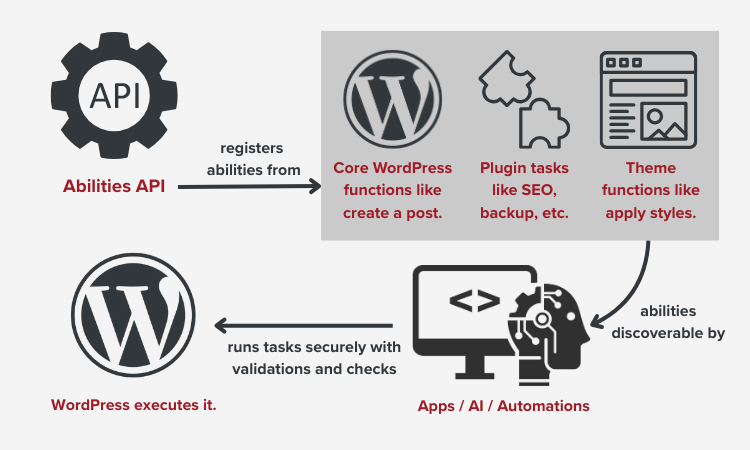
For example, these are some abilities that can be registered:
- Analyze SEO content
- Generate reports
- Create or update posts
- Run database backups
After the abilities are registered, external tools, like AI agents, can automatically find and use them. However, this works with WordPress permission rules.
Guess what? AI platforms like ChatGPT may get to trigger plugin actions, optimize content, or automate workflows in the future. That too without coding.
If you’re a developer, then you can start using the Abilities API in WordPress 6.9. WooCommerce has already opened the door to enable smarter automations, low-code tools, and AI-based WordPress applications through MCP integration.
ii. Enhancements to the Interactivity API
WordPress 6.9 also enhances the Interactivity API. That’s in two different ways.
First, it smoothens client-side navigation and makes your website behave like an app. That’s by handling more actions right in the browser. Meaning, your website can update pages or transition between content in the browser without a full reload.
In addition, the upcoming version also prepares for futuristic features, like instant search and submitting comments without refreshing the page. Simply put, you can access improvised patterns that have conditional loading of scripts and modules.
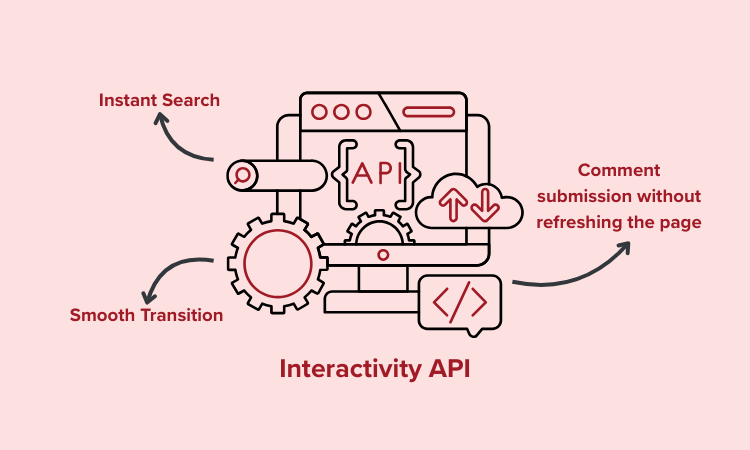
Therefore, these changes let you own an app-like, responsive website with a smoother user experience without unnecessary data transfers.
iii. Block Binding Improvements
Moving forward, WordPress 6.9 updates the block-building function. With that, you can connect more block attributes to external or custom data sources.
Simply put, things like an image caption, custom field value, or API data can now be bound directly to a block’s attribute. That too without a whole new block type.
Developers get ‘block_bindings_supported_attributes_{$block_type}’, a new filter. This enables you to specify exactly which attributes of a block can be connected.
On the other hand, users get an updated editor interface to easily switch data sources and attributes within a click.
iv. Support to Border Radius Presets in Theme.json
If you’re a theme author, then there’s good news! The upcoming WordPress version lets you define border-radius presets in the theme.json file. For example, you can specify ‘Small,’ ‘Medium,’ and ‘Large.’
Hence, these presets will appear in the editor’s block controls. With that, you can easily pick the presets instead of guessing or typing a custom number every time.
{
  "version": 3,
  "settings": {
    "border": {
      "radiusSizes": [
        {
          "name": "Small",
          "slug": "small",
          "size": "7px"
        },
        {
          "name": "Medium",
          "slug": "medium",
          "size": "10px"
        },
        {
          "name": "Large",
          "slug": "large",
          "size": "16px"
        }
      ]
    }
  }
}
Source: WordPress.org Core Blog
Another advantage! Modifying one preset updates all blocks that use it. So, it becomes easier for you to maintain your website. Less custom CSS, fewer inconsistencies, and quicker styling across blocks.
v. Alterations in DataForm and DataViews
DataViews and DataForm components also get a huge upgrade in WordPress 6.9.
Exactly, lists in your dashboard will now support improved sorting, filtering, and infinite scroll. While forms will have flexible layouts, like cards, rows, panels, etc.
As a developer, you can quickly build complex admin interfaces or custom apps. You can use pre-built building blocks to focus on functionality rather than design.
vi. Easy Specification of Heading Block CSS
Along with that, the new version will also let you easily style the Heading block. That’s because the CSS now behaves more predictably. So, headings look the same across the site without random style conflicts.
h1, h2, h3, h4, h5, h6 {
  &:where(.wp-block-heading).has-background {
    padding: ...;
  }
}
Source: WordPress.org Core Blog
This reliable default styling ensures that there won’t be the need for many CSS overrides. Hence, customizing heading styles becomes faster and more consistent.
vii. More Developer-Friendly Features
Apart from these, here are additional developer-focused updates in WordPress 6.9:
- Two new PHP functions are ‘array_first()’ and ‘array_last().’
- External libraries bundled with WordPress, including PHPMailer and Sodium Compat, are updated to newer versions.
- Transparent PNGs are now handled more reliably with improvement fixes.
- 8 action hooks and 13 filter hooks in WordPress 6.9 will let developers have more places to extend and customize core features.
And that’s all for here!
Check out everything about WordPress 6.9 on its official news blog.
Frequently Asked Questions (FAQs)
Missed answers to some common questions? Check it here:
1. When will WordPress 6.9 release?
WordPress 6.9 will be released on 2nd December, 2025. Currently, the Beta versions and Release Candidates have already been released.
2. How to try the Beta or Release Candidate versions of WordPress 6.9?
There are four ways to try the Beta or Release Candidate versions of WordPress 6.9. They are by using the WordPress Beta Tester plugin, installing its ZIP file, entering the WP-CLI command, or using its WordPress Playground instance.
3. How can I update to WordPress 6.9 once it’s released?
You can update to WordPress 6.9 or any other newer version on your dashboard. Go to ‘Dashboards > Updates’ and hit the ‘Update Now’ button. Hosting services like Hostinger may perform automatic updates. Check out how to update WordPress to the latest version.
4. What are the new blocks to be added in WordPress 6.9?
The new blocks to be added in WordPress 6.9 are the Math, Word Count, Terms Query, Accordion, and Time to Read blocks. Each of these is awaited by users.
5. How can I contribute to WordPress 6.9 or future releases?
You can contribute to WordPress 6.9 or future releases by testing the version on any environment, like your hosting platform. You can check the compatibility with any theme or plugin or help to translate WordPress content. All the links to start or share your contribution on this news article.
Check out how to create a WordPress site from scratch in this beginner’s guide.
Wrapping Up
This ends our review on WordPress 6.9 and everything you need to know about it.
So, should you update to WordPress 6.9 once it’s released?
Absolutely! This upcoming version offers an improved experience for everyone in terms of performance, design, control, collaboration, and content creation.
If you haven’t tried it yet, then make sure to back up your website first. Comment down if you have a feature that you liked the most or have any questions to ask.
Until we reply to you, go through our guides on how to check the WordPress version of your website and Generative Engine Optimization for WordPress.
Want to stay connected? Follow us on our Facebook and X accounts right now!
YOU MIGHT ALSO LIKE...
We've picked you some best articles that you might be looking for. Check them now!